Prompting Guide for Promptchan AI
Promptchan Team
August 8, 2023
What is Prompting?
Crafting effective prompts in Promptchan AI is both an art and a science. This guide distills insights and strategies from experienced users to help you elevate your art creation process. Explore how to harness the power of precise, detailed prompts to generate artwork that aligns closely with your vision.
Anatomy of a Good Prompt
A compelling Promptchan AI prompt is detailed, specific, and thoughtfully constructed. Consider these categories as a checklist for crafting your prompts:
- Subject: Be clear about the main focus of your artwork.
- Setting: Describe the location or background of your artwork.
- Style: Fine-tune the artistic style you envision.
- Medium: Indicate if you prefer digital art, oil painting, sketch, etc.
- Color Palette: Mention if you have specific colors or tones in mind.
- Mood and Atmosphere: Describe the overall mood or atmosphere.
- Detail Level: Clarify how detailed or abstract you want the piece to be.
Starting with a basic prompt and iteratively adding details based on these categories can dramatically enhance the relevance and quality of the generated artwork.
Negative Prompts
The negative prompt is where you put what you don't want — it is the single fastest fix for most disappointing results. Extra limbs, watermarks, a background you keep getting by accident, a style bleeding in from a preset: list them here rather than trying to phrase them out of the main prompt. It takes up to 250 characters.
Quality Tiers
Quality is a separate control from the prompt, and it costs more Gems as it climbs:
- Ultra — the everyday setting; fast and cheap.
- Extreme — noticeably more detail; included with Plus and Premium.
- Max — the highest tier, included with Pro.
If you are comparing Promptchan against another tool, compare at Extreme or Max. Benchmarks run on the default setting undersell what the models can do.
Iterative Prompt Building
Begin with a simple prompt. Evaluate the output, then refine your prompt by adding or adjusting details. This iterative process allows you to closely align the final artwork with your initial vision, achieving greater precision with each iteration.
- Keyword Blending: Combine different concepts or styles for unique outcomes.
- Character Consistency: Utilize the AI Character feature for uniform character faces.
- Emphasis Techniques: Use double parentheses for emphasis (e.g., ((red)) dress).
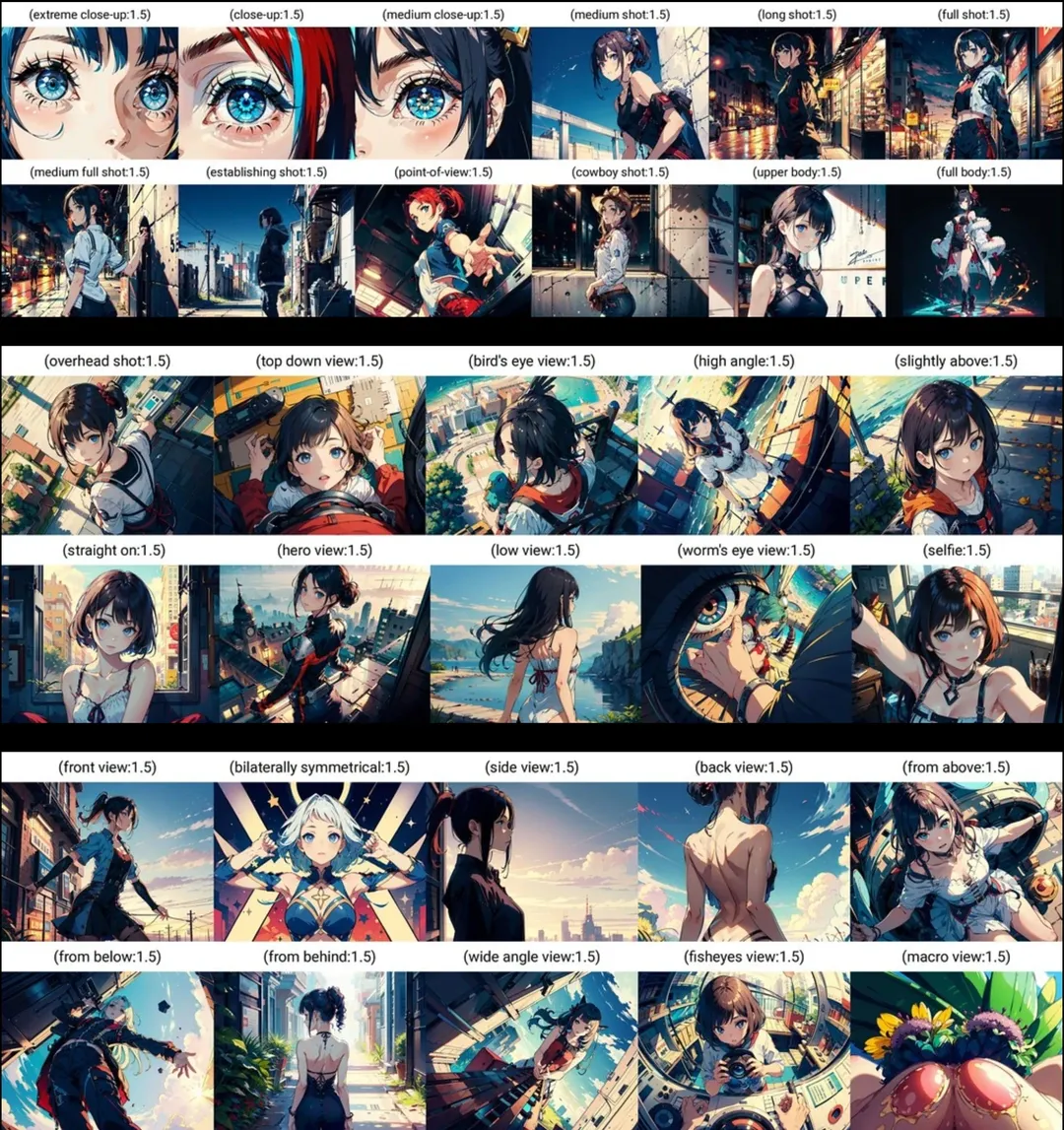
- Camera Perspectives: Specify shots like 'full', 'medium', or 'closeup' to guide the visual composition.
- Creativity: A slider rather than a preset. Lower values stick closely to your prompt; higher values let the model take liberties. Drop it when a prompt is being ignored, raise it when results feel repetitive.
Understanding Camera Angles in AI Art
The angle of the camera can greatly influence the storytelling and impact of your art. Below are some camera angles and their effects that you can use in your prompts:
- Extreme Close-Up: A very tight shot that captures a small part of the subject, such as the eyes.
- Close-Up: A shot that focuses closely on the subject, typically the face.
- Medium Close-Up: A shot framing the subject from about the chest up.
- Medium Shot: Frames the subject from the waist up, balancing the figure and the background.
- Long Shot: Captures the subject fully, from head to toe, within their surrounding environment.
- Full Shot: Includes the entire body of the subject, often used to show action or a character's full presence.
- Establishing Shot: A wide shot that shows the setting or context of the scene.
- Point of View: Shows a scene from the subject's perspective, as if through their eyes.
- Cowboy Shot: Framed from mid-thighs up, traditionally used in Western films to show the gun holster.
- Upper Body Shot: Frames the subject from the chest up, emphasizing their upper body and expression.
- Overhead Shot: A shot looking down on the subject from above, often to establish a scene or show a layout.
- Top-Down View: Directly above the subject, showcasing a scene or action from a bird's-eye view.
- Bird's Eye View: A high angle shot looking down at the subject or scene from a significant height.
- High Angle: The camera looks down at the subject, making them appear smaller, weaker, or more vulnerable.
- Slightly Above: The camera is just a little above the subject's eye level, giving a general overview.
- Straight-On: The camera is level with the subject's eye line, suggesting neutrality.
- Hero View: A low-angle shot that makes the subject look larger than life, like a hero.
- Low View: The camera is placed lower than the subject, looking up, often imparting a sense of grandeur.
- Worm's Eye View: An extreme low angle shot looking up from ground level.
- Selfie: A handheld shot taken by the subject, typically at arm's length.
- Front View: A direct frontal shot where the subject faces the camera squarely.
- Bilaterally Symmetrical: A shot where the subject is in the center, with a symmetrical composition.
- Side View: The subject is viewed from the side, often used to show their profile.
- Back View: The camera captures the subject from behind, sometimes to conceal their identity or show what they're looking at.
- From Above: The camera is positioned above the subject, looking down at a slight angle.
- From Below: Looking up at the subject from a low angle, can give a sense of height or power.
- From Behind: The camera is placed behind the subject, potentially creating a sense of mystery or following their gaze.
- Wide Angle View: A shot that uses a wide-angle lens to capture a broader view of the scene.
- Fisheye View: A wide-angle shot that creates a spherical distortion of the scene.
- Macro View: An extreme close-up shot usually used to capture tiny subjects like insects or the details of a surface.
Join the Community
Engage with the Promptchan AI community for inspiration, support, and to share your own discoveries.
Your journey with Promptchan AI is limited only by your imagination. Start creating today, and see where your prompts take you!
Related articles
How to Make AI Videos on Promptchan
Learn how to make AI videos on Promptchan. Animate any image into motion, create a video straight from a text prompt, extend your favorites, and bring your AI girlfriend to life — a friendly beginner tutorial.
How to Chat with AI on Promptchan
Learn how to chat with AI companions on Promptchan. Browse the Discover feed, start a conversation, pick her voice, create images mid-chat, and build your own custom AI girlfriend — a friendly beginner guide.
How to Buy Crypto for Promptchan AI
A concise guide on buying cryptocurrency to upgrade or purchase Gems on Promptchan AI.
Services