Getting Started with Promptchan API
Promptchan Team
August 8, 2023
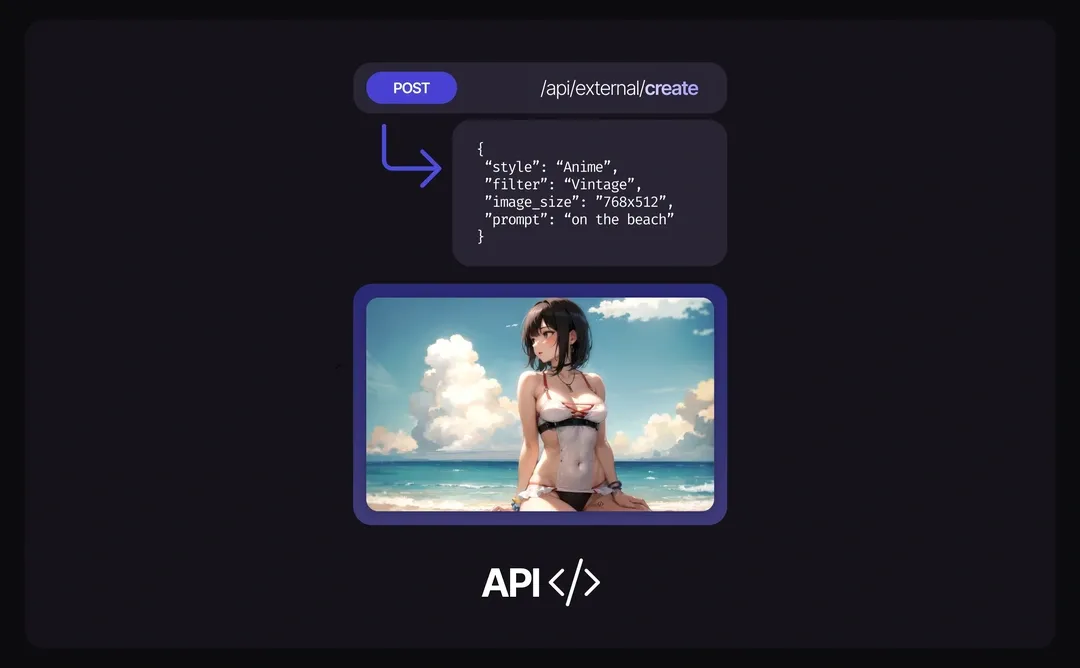
The Promptchan API lets your own application generate AI images and videos and chat with AI characters. This guide takes you from a new account to your first image, video and chat reply, with examples you can copy. Every field is listed in the API reference.
Step 1: Create an account and an API key
- Sign up, or log in.
- Open Settings, find API Key and click Generate.
- Copy the key now: it is shown once. Generating a new key revokes the old one.
Keep the key on your server. Send it in the x-api-key header with every request, and never put it in a web page or an app you ship: anyone who has it can spend your Gems. The examples below read it from an environment variable:
export PROMPTCHAN_API_KEY="your key"
Step 2: Add Gems
Every generation is paid in Gems from your account. Buy them at promptchan.com/gems. They're added as soon as the payment goes through.
- Image: 1 Gem (2 on XL models), +1 at Extreme quality or +2 at Max, +1 for Face Enhance, plus 0.25 per API request. Realism XL 2 and Anime XL 2: 4 Gems. AI Character: +1 (v3: +3).
- Video v4: 15 Gems to animate an image, 13 plus its first image from a prompt; High quality +10, sound +3.
- Video v4-voice: 18 Gems for 6 seconds, 30 for 10, sound and speech included; 48 fps +3 / +5, high resolution +13 / +22. An extend costs 15.
- Chat: 0.4 Gems a message on
250-large, 0.2 on250-small.
Each model needs the same plan as on the website, and video needs the Pro plan. Every answer tells you your balance (gems), so you can track spend without a second call.
Step 3: Pick a model
The API uses the model names the website shows: Realism XL 2, Anime XL 2, Photo XL+, Hyperreal XL+ and the rest. The catalog lists every one, whether your plan can use it, and the poses, filters, expressions and video options each takes:
curl https://prod.aicloudnetservices.com/api/external/catalog \
  -H "x-api-key: $PROMPTCHAN_API_KEY"
Step 4: Your first image
Images and chat are served from https://prod.aicloudnetservices.com. Send a model and a prompt to /api/external/create:
curl https://prod.aicloudnetservices.com/api/external/create \
  -H "x-api-key: $PROMPTCHAN_API_KEY" \
  -H "Content-Type: application/json" \
  -d '{
    "model": "Realism XL 2",
    "prompt": "a woman reading in a sunlit garden",
    "aspect": "Portrait"
  }'
The answer has the image as a base64 JPEG, its id, the seed it used and what it cost:
{
  "image": "/9j/4AAQSkZJRgABAQ…",
  "image_ids": ["Qm3v9XkT2fLp8sYwRz1a"],
  "model": "Realism XL 2",
  "seed": 2507003101,
  "gems_cost": 4,
  "gems": 96
}
The same request in Python, saving the image to a file:
import base64, os, requests

response = requests.post(
    "https://prod.aicloudnetservices.com/api/external/create",
    headers={"x-api-key": os.environ["PROMPTCHAN_API_KEY"]},
    json={
        "model": "Realism XL 2",
        "prompt": "a woman reading in a sunlit garden",
        "aspect": "Portrait",
    },
    timeout=120,  # an image can take up to a minute and a half
)
body = response.json()
if not response.ok:
    raise SystemExit(f"{body['code']}: {body['error']}")
with open("image.jpg", "wb") as f:
    f.write(base64.b64decode(body["image"]))
And in JavaScript (Node 18 or later):
import { writeFile } from 'node:fs/promises'

const response = await fetch(
  'https://prod.aicloudnetservices.com/api/external/create',
  {
    method: 'POST',
    headers: {
      'x-api-key': process.env.PROMPTCHAN_API_KEY,
      'Content-Type': 'application/json',
    },
    body: JSON.stringify({
      model: 'Realism XL 2',
      prompt: 'a woman reading in a sunlit garden',
      aspect: 'Portrait',
    }),
  },
)
const body = await response.json()
if (!response.ok) throw new Error(`${body.code}: ${body.error}`)
await writeFile('image.jpg', Buffer.from(body.image, 'base64'))

Options you'll use most (all optional; the reference and the catalog list every value):
aspect:Portrait,WideorSquare, as on the website.poses: up to three poses, such as["POV Missionary"].filterandemotion: the website's filters and expressions for that model.quality:Ultra,ExtremeorMaxon the older models; Realism XL 2 and Anime XL 2 render at their own quality.count: up to four images at once on the Pro plan, as the website's grid.save_to_gallery: keep the images in your private gallery; the answer then has links (image_urls) instead of base64.character_image_id: AI Character, from the id of one of your own saved images, withcharacter_versionv2orv3. A character only ever comes from an image made and saved on Promptchan, never from a link or an upload.negative_prompt,seed,restore_faces, and theage_slider,weight_slider,breast_sliderandass_sliderattributes.
A request is checked whole before anything is charged: a name the model doesn't know is a 400 that lists what it accepts. Requests written for the older API, with style instead of model, still work.
Step 5: Your first video
Video is served from its own host, https://film.aicloudnetservices.com, with the same key. Choose the model with video_model, as on the website:
v4has the strongest motion:quality(StandardorHigh),loopandaudio.v4-voicespeaks: adialogueline withdialogue_speaker,dialogue_toneanddialogue_accent, alengthof 6 or 10 seconds, 24 or 48fps,resolutionandcamera_move. Sound is always on.autouses v4-voice when there is a line to speak, and v4 otherwise.
Start from a prompt (with model, pose, the attributes and an optional character_image_id), or animate one of your own saved images with image_id. A video takes a few minutes, so you submit it, check its progress, then collect it:
import os, time, requests

VIDEO = "https://film.aicloudnetservices.com/api/external/video_v4"
headers = {"x-api-key": os.environ["PROMPTCHAN_API_KEY"]}

job = requests.post(f"{VIDEO}/submit", headers=headers, timeout=60, json={
    "video_model": "v4-voice",
    "model": "Realism XL 2",
    "prompt": "she leans towards the camera and smiles",
    "dialogue": "I was hoping you'd come by.",
    "dialogue_tone": "seductive",
    "length": 6,
}).json()
request_id = job["request_id"]

while True:
    status = requests.get(
        f"{VIDEO}/status_with_logs/{request_id}", headers=headers, timeout=30
    ).json()
    if status.get("status") == "Failed":
        # A failed video's Gems are refunded
        raise SystemExit(f"Failed: {status.get('failure_reason')}")
    if status["progress"] == 1:
        break
    time.sleep(10)

result = requests.get(
    f"{VIDEO}/result/{request_id}", headers=headers, timeout=30
).json()
print(result["video"][0])  # a link to the MP4: download it, as it expires
print(result["video_id"])  # what an extend names
progressruns from 0 to 1. While the job waits,current_queue_lengthsays how many jobs are ahead of it.- Extend a video by about 6 seconds with
POST /api/external/video_v4/extendand itsvideo_id: in the same pose ("mode": "continue"), or"mode": "change"with a newpose, and a new spoken line on a v4-voice video. - You can submit one video a minute. Sooner answers
429, withRetry-Afterandsecondsto wait. GET /api/external/video_v4/video_statuslists your video jobs of the last 24 hours.
Step 6: Chat
Send the user's message, the character you want (characterData) and the conversation so far (chatHistory) to /api/external/chat:
{
  "message": "Hey, what are you up to tonight?",
  "userName": "Alex",
  "isRoleplay": false,
  "characterData": {
    "name": "Michelle",
    "personality": "Playful, warm, a little sarcastic",
    "scenario": "Texting late at night from her apartment",
    "sexuality": "Straight",
    "openness": 1,
    "emotions": 1
  },
  "chatHistory": []
}
characterData needs all six fields shown (openness and emotions run from 0 to 2). The answer has the reply (message), the updated chatHistory, your gems and the model that answered. Send that chatHistory back with the next message to continue the conversation. Set isRoleplay for story-style replies, redo to regenerate the last reply, and model to 250-small for the faster, cheaper model.
Errors and retries
Every answer carries an X-Request-Id header: quote it if you contact support. GET /api/external/account shows your
plan, Gems and API key, and GET /api/external/usage?days=7 your requests by day: how many, how many were refused or
failed, and what images cost.
Every failure is JSON in one shape:
{ "error": "Insufficient gems", "code": "insufficient_gems", "retryable": false, "gems": 0.5 }
- Switch on
code, not on the message. retryable: falsemeans sending the same request again will fail the same way: fix the request, the plan or the balance first.retryable: truemeans it was on our side: wait a moment and send it again.- Nothing is charged for a refused request, and a render that fails on our side is refunded.
- Safe retries: send an
Idempotency-Keyheader (your own id, a UUID say) with an image (modelform), a video or an extend. If the connection drops or times out, send the same request with the same key: you get the first answer back, markedIdempotent-Replayed: true, and nothing renders or charges twice. A replayed image answer has itsimage_idsbut not the pixels. While the first is still running you get409 idempotency_in_progress(wait and send it again); the same key with a different body is422 idempotency_key_reused. Keys last 30 days. - Common codes:
invalid_parameters(seedetails),invalid_model,invalid_pose,invalid_filter,insufficient_gems(402),plan_restricted(403, withplan),character_image_not_found,content_blocked,rate_limited(429, withseconds),model_warming(503, with asuggested_modelthat is ready now),queue_full(503: every video worker is busy), andwrong_host(400, a video request sent to the image host).
Conclusion
That's the whole API: images with the website's models, voiced video and chat, behind one key. The API reference lists every field and value, including the ones this guide skipped.
Tags: #PromptchanAPI #AIImageGeneration #APIGuide
Meta Description: Get started with the Promptchan API: an API key, then images, video and chat, with examples in curl, Python and JavaScript.
Related articles
How to Make AI Videos on Promptchan
Learn how to make AI videos on Promptchan. Animate any image into motion, create a video straight from a text prompt, extend your favorites, and bring your AI girlfriend to life — a friendly beginner tutorial.
How to Chat with AI on Promptchan
Learn how to chat with AI companions on Promptchan. Browse the Discover feed, start a conversation, pick her voice, create images mid-chat, and build your own custom AI girlfriend — a friendly beginner guide.
How to Buy Crypto for Promptchan AI
A concise guide on buying cryptocurrency to upgrade or purchase Gems on Promptchan AI.
Services